
Glanceable status
Keep a small set of important Docker targets visible on Home Screens and the Mac desktop.
Native widgets
Use WhaleDeck widgets on iPhone, iPad, and Mac for glanceable Docker server and container status, then open the full app for investigation.
Manage one server for free. Optional one-time Pro upgrade.
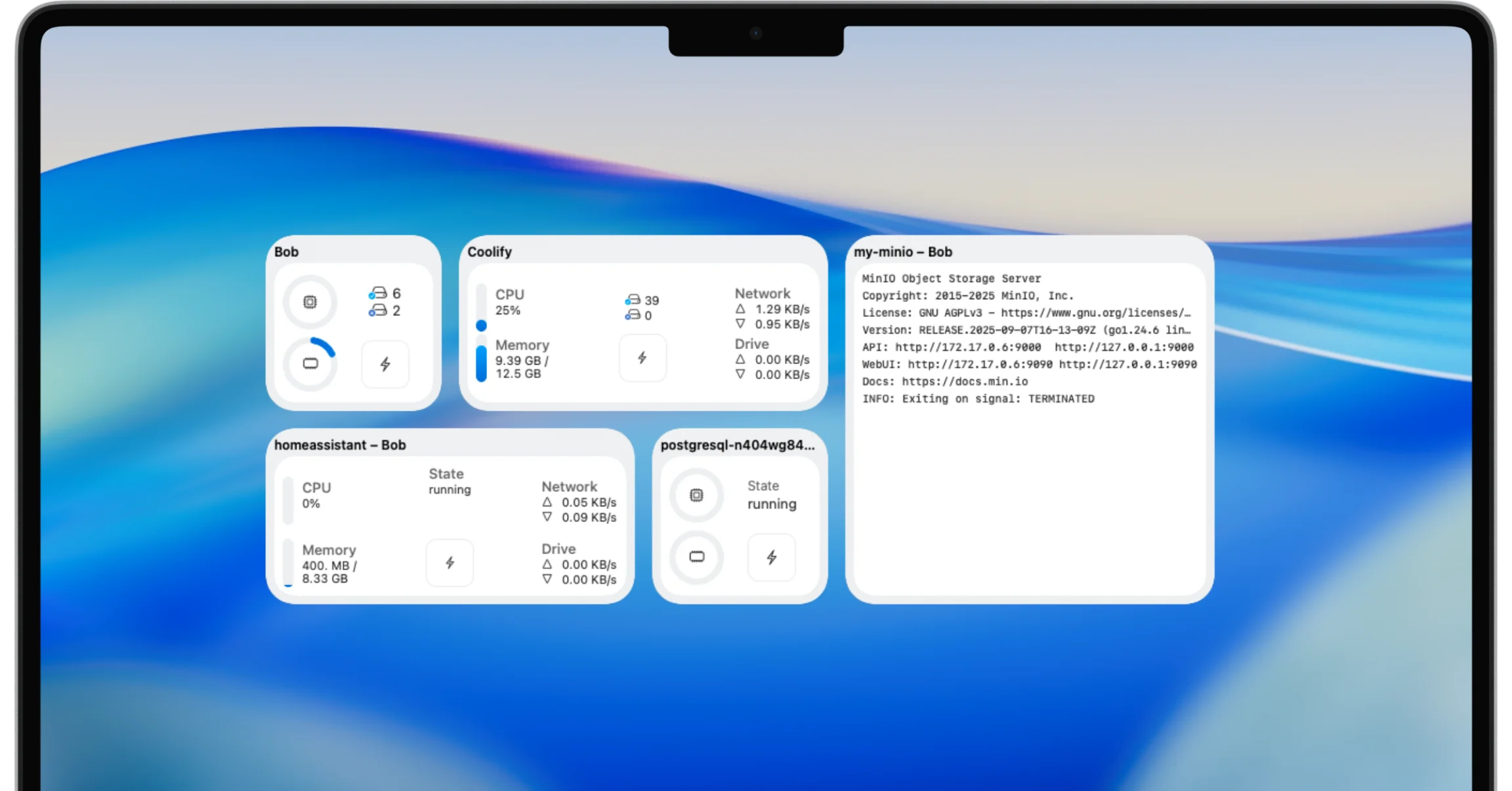
WhaleDeck widgets show selected Docker server or container information on iPhone, iPad, and Mac. They are designed for glanceable awareness and fast navigation, while reliable alerts and historical monitoring remain the responsibility of a dedicated observability system.
A Docker widget should answer one small question without demanding a dashboard session. Is the important server reachable? Is the selected container running? Does a current resource value look unusual enough to investigate?
WhaleDeck brings that snapshot into Apple platform surfaces you already see. The widget becomes a quiet indicator and a direct entry point into the server or container, not a miniature operations center packed with every metric.
Keep a small set of important Docker targets visible on Home Screens and the Mac desktop.
Open the relevant WhaleDeck context when a state or value needs investigation.
Use native widget surfaces across iPhone, iPad, and Mac instead of maintaining another browser dashboard.
Reachability and lifecycle state are high-signal because a change can prompt immediate investigation. CPU, memory, storage, or network values are useful when the normal range is understood. A percentage without history can be misleading for bursty builds or workloads that intentionally cache memory.
Select only targets that deserve persistent attention. A gateway, automation service, or critical home infrastructure container may qualify. Showing every container creates visual noise and makes the widget easier to ignore.
A deliberately small widget set also makes unexpected changes easier to notice during an ordinary day.
Apple platforms schedule widget refreshes according to system policy, available budget, app behavior, and device conditions. A widget therefore represents a recent snapshot rather than guaranteed real-time telemetry. The detailed app view remains the source for a current operational decision.
Design the workflow around that limitation. Use clear target names and freshness information where available. Open WhaleDeck when the displayed state matters, and use active monitoring for incidents that require reliable notification.
A layered workflow is stronger than asking one surface to do everything. Monitoring probes the service and sends alerts. The widget provides ambient awareness. WhaleDeck exposes current Docker state, relationships, and logs. Historical systems explain trends and cross-service impact.
This separation makes each signal easier to trust. The widget does not need aggressive refresh behavior, and the operator does not need to infer application health from a single color or number.
Remove retired servers and containers, rename ambiguous targets, and replace widgets that no longer lead to action. Shared device screens should not expose sensitive host names or operational details that the environment considers confidential.
Use text and symbols together with color so the state remains understandable. A useful Docker widget is compact, current enough for its purpose, and connected to a deeper investigation path.
Not guaranteed. Widget refresh timing is managed by the operating system, so open WhaleDeck for current details.
No. Use active checks and notifications for reliable incident detection.
WhaleDeck supports native widget experiences across compatible iPhone, iPad, and Mac surfaces.
Choose a small number whose state would cause you to investigate or change your immediate behavior.